Until this week, a business had no direct line into ChatGPT. ChatGPT built its picture of you from your website, your listings, your reviews, and whatever else it found. The only way to see that picture was to ask ChatGPT yourself, one question at a time.
On November 10, 2026, OpenAI launched Businesses in ChatGPT in beta. You can now claim your business, correct its details, add a product feed, and see how often ChatGPT mentions you. Eligible US online stores and online service businesses can also publish a Business Agent: a chat inside ChatGPT that answers customer questions for the business. What the launch does not change is how ChatGPT decides whom to recommend. OpenAI's own FAQ is plain about it: "Claiming does not guarantee higher placement or sales."
So the profile and the agent are now yours to manage, and being named in the answer is still earned the old way. Most of the mistakes I expect from this launch will come from mixing those two jobs up.
What OpenAI launched
Businesses in ChatGPT has three parts, plus an ad option. You manage the first three in Business Hub, which opens from the ChatGPT sidebar or at chatgpt.com/business-hub.
| Part | What it does | Who can use it at launch |
|---|---|---|
| Business profile | Claim and verify your listing, then update your website, description, category, logo, policies, and product feed | Eligible businesses where ChatGPT is available. Local stores and restaurants can claim only an existing US listing. |
| Insights | Mentions, website clicks, and discovery topics for the past 28 days | Claimed businesses that pass OpenAI's identity check |
| Business Agent | A labeled chat, opened from your profile, that answers with the facts and guidelines you set | Eligible US ecommerce and online service businesses with a website |
| Sponsored Business Agent | Your agent as the destination of a ChatGPT ad | Eligible advertisers, rolling out in Ads Manager over the coming weeks |
The customer path is short. Someone asks ChatGPT to compare options, and your business shows up in the answer. They click through to your ChatGPT profile. If you published an agent, they can start a chat with it. That chat is labeled, kept apart from their original conversation, and separate from ChatGPT's own answers. The agent can explain your products and policies and link to your website. It cannot take an order, book an appointment, or look up a customer's order.
OpenAI puts the audience at 1.2 billion people a week. Claiming a business and publishing an agent were free at launch, according to Digiday's briefing with OpenAI, as reported by VentureBeat. OpenAI left room to charge later.
The names are easy to mix up. Business Hub opens with a Get started panel of three cards:
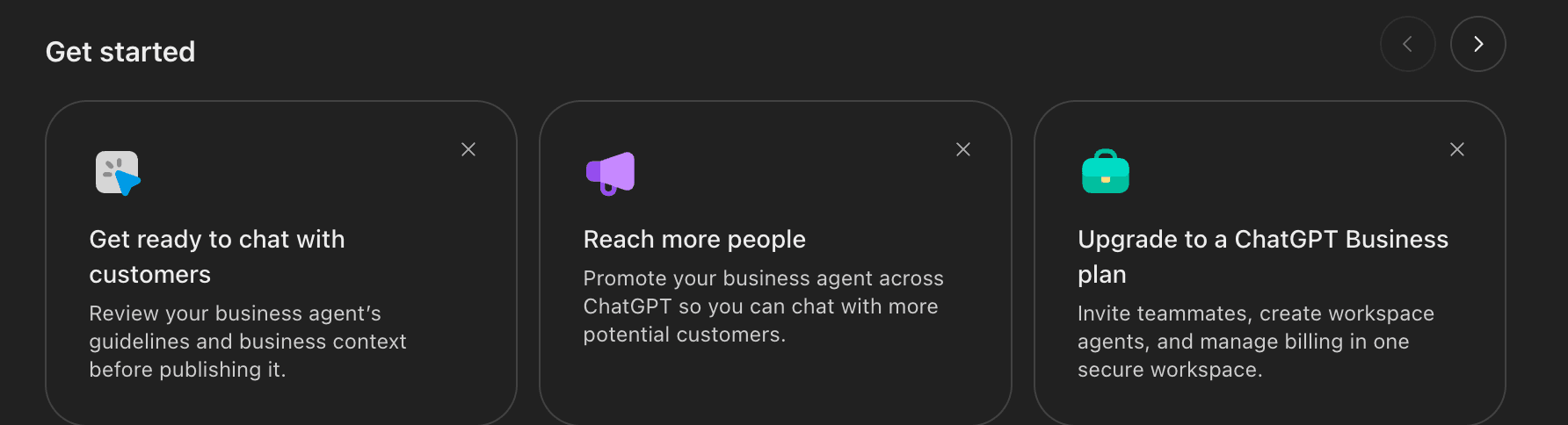
The first card is the agent: review its guidelines and business context before you publish. The second is the ad option. The third is a different product. ChatGPT Business is OpenAI's paid workspace for your own team, with teammates, workspace agents, and billing in one place. Businesses in ChatGPT is about your customers. OpenAI's setup guide does not list a paid plan as a requirement for claiming a business or publishing an agent.
Claim your profile first
Your business can appear in ChatGPT whether you claim it or not. OpenAI says ChatGPT may show information about a business when customers ask relevant questions, with or without an agent. Claiming is how you get a say in that information.
There are two gates.
- Claim the listing. Find your business in Business Hub and prove the link. You can use a code sent to the business phone or business email, a TXT record on your website's domain, or your Shopify store. OpenAI reviews the claim and emails you its decision.
- Pass the identity check. Before you can publish changes, connect a product feed, see insights, or create an agent, the person managing the listing must pass identity verification through Persona. Expect to need a government ID, business registration details, and proof that you can represent the business. The blue check on your profile appears after this step, not after the claim.
Once both are approved, you can edit your website, description, category, logo, delivery policy, return policy, and cover photo. OpenAI reviews each change before it goes live, and the setup guide warns that updates take time to reach answers. It also says ChatGPT may use other sources about your business. Your profile is one input, not the source of truth. If your website says returns take 14 days and your profile says 30, you have handed ChatGPT a conflict to settle.
Retailers can add a product feed with prices and availability. That can be a CSV that follows OpenAI's product feed spec, a hosted feed URL, or a Shopify connection. Products from eligible Shopify stores were already in ChatGPT through Shopify Catalog, and connecting the store can create a draft agent for you. A feed does not publish an agent, and it does not promise recommendations.
Three details are worth knowing before you start:
- If someone else already claimed your business, open its profile and choose Dispute ownership.
- Each brand is claimed and managed on its own. There is no central management across a parent company's brands, and claiming the main brand does not claim its locations.
- If the listing shows Contact support, it is locked, and you have to ask OpenAI for access.
Claim now, even if you never publish an agent. It takes a DNS record or a phone code plus an ID check, and you only see insights after you claim.
What the insights tell you, and what they leave out
Business Hub's Insights tab covers the past 28 days and shows three things:
- Mentions. How often ChatGPT referenced your business.
- Website clicks. How often people clicked through to your site.
- Discovery topics. Common themes in the answers that mentioned or cited you.
The definitions matter more than the numbers. For an online business, a mention counts only when ChatGPT references your website. OpenAI's help center says the brand name alone does not count. For a local business, a mention counts whenever ChatGPT shows a result for that location, even if nobody opens the listing. An online store and a dentist with the same mention count are measuring different events.
We split those events in Canonry. A mention is your brand in the answer text. A citation is your domain in the sources behind the answer. By that standard, Business Hub's mention for an online business is closer to a citation. An answer that recommends your store by name, without pointing to your site, is a real recommendation. It does not show up in that count.
The other limits come from privacy, and they are fair:
- You never see prompts or chats, including chats with your own agent. Discovery topics are themes across answers. OpenAI says they are not individual questions and do not directly measure intent.
- A metric stays blank until activity passes a reporting threshold. Blank does not mean zero, and a small business may see blanks for a while.
- The window is 28 days, and it covers ChatGPT only.
- OpenAI's docs describe no competitor view. You see that you appeared, not who appeared next to you.
Here is how Business Hub lines up against tracking you run yourself:
| Question | Business Hub | Your own tracking |
|---|---|---|
| How often does ChatGPT point to my site? | Mentions, for online businesses | Citations for each question you track |
| Does ChatGPT name me without linking my site? | Not counted for online businesses | Mentions for each question you track |
| Which questions bring me up? | Discovery topics, as themes | The exact questions, with the full answers |
| Who else gets named? | Not shown | The competitors in each answer |
| What about Gemini, Claude, and Perplexity? | Not covered | The same questions, asked of each |
| What happened after the click? | Website clicks | Visits, leads, and orders in your analytics and server logs |
| How far back can I look? | 28 days | Every run you store |
Use Business Hub for what only OpenAI can see: real volume from real users. Use your own tracking for the question-level evidence you need to fix something. In the dashboard, a website click is the clearest signal, because it is a person taking a step. Whether that visit turned into a sale is a question for your own analytics.
Discovery topics still earn their place. If shipping times keep showing up as a theme, make your delivery policy specific, on your website and in your profile. Then check whether the theme changes over the next 28 days.
A Business Agent is only as good as its facts
OpenAI runs the agent. You supply what it knows and how it should behave. If your business already has a plugin in ChatGPT, the agent's chat does not use its data or features.
The setup in Business Hub is short:
- Open your claimed, verified business and create an agent. Shopify setup may have made a draft already.
- Review the information it will use, such as product details and your return policy.
- Write instructions for how it should answer, within the Business Agents Policy.
- Preview it with a question customers often ask. When an answer is wrong, fix the information or the instructions and test again.
- Publish. Customers can only chat with a published agent.
The Business Agents Policy is the real spec, and it is stricter than most chat widgets. The agent must be clear that it is AI speaking for your business. You cannot tell it to invent offerings, prices, availability, credentials, reviews, guarantees, or results, or to hide fees and conditions that matter to the question. It cannot pressure people, create false urgency, or keep pushing after someone says no. It can offer a follow-up and collect contact details only through an approved feature, and only when the customer chooses to share them. It cannot give advice that legally needs a license. OpenAI applies these rules when you create the agent and every time you change it, and it can pause or remove an agent that breaks them.
Most bad answers will not come from the guidelines. They will come from the facts. OpenAI's guide for sponsored agents draws the line well: when an answer is wrong, fix the business information, and when the tone or behavior is wrong, fix the guidelines. No guideline can rescue a return policy that says two different things on two pages.
So the real work is a test set, not a prompt. Before we publish an agent, we write down the questions customers actually ask. They come from the support inbox, sales calls, reviews, site search, and the questions we already track in ChatGPT. Start with about thirty. Each one gets an expected answer and the page it should link to. Then run all of them in preview and grade every answer:
- Is it correct, and does it match the website?
- Does it link to the right page?
- Does it say it does not know when the facts are missing?
- Does it stay inside the policy?
Put the most weight on the questions where a wrong answer costs money: returns on sale items, shipping times, what a price includes, whether a product fits a use. Run the set again after every price, policy, or catalog change, because the agent can only answer from the information it was last given.
Verify the listing and pass the Persona identity check.
Fix the profile, policies, product feed, and the website pages behind them.
Run real customer questions in preview until every answer and link is right.
Read Business Hub insights next to question-level tracking and your analytics.
Sponsored agents are a separate build
The second card, promoting your agent across ChatGPT, runs through ChatGPT Ads. A Sponsored Business Agent lets someone start a chat from an ad instead of going straight to your site. OpenAI says ads do not influence ChatGPT's answers.
Setting up a Sponsored Business Agent happens in Ads Manager, not Business Hub:
- Agent builder is rolling out to eligible ad accounts over the coming weeks.
- The agent has two main fields, Business info and Guidelines, plus a tagline and optional conversation starters.
- It runs only on a campaign with the Conversion optimization objective and Enable agent chats turned on. Publishing the agent alone does not start delivery.
- Chats carry no separate charge. Your campaign's billing applies.
- You still get no transcripts. Where available, the Insights tab in Ads Manager shows patterns such as the most common questions. After more than 25 conversations, an insights agent can help you dig into them.
The detail that will catch people: the Business Hub agent and the Ads Manager agent do not sync today. OpenAI says it is working on linking them. Until then, a change to your return policy has to be made in both places, and both agents need the same tests. If we run your ChatGPT campaigns through Canonry Ads, the sponsored agent goes through the same test set as the one on your profile.
How Canonry Managed sets this up
We added ChatGPT setup to Canonry Managed.
Two steps belong to the business owner. You claim the listing, and you pass the Persona check, because OpenAI ties both to a person who can represent the business. Then you add us in Business Hub. OpenAI's setup guide lets the admin who claimed the business add teammates and give an agency access to manage the business or its agent, each with their own ChatGPT account.
From there, we do the work:
- Profile and feed. We write the description, set the category, and make the delivery and return policies match your website. For retailers, we build or clean the product feed and check it against the live product pages.
- Website. Your profile feeds the agent, but ChatGPT's answers still draw on your site and other sources. We fix the pages that answer buying questions and run the agent-ready check on them.
- Agent. We write the business context and guidelines, build the test set from your real customer questions, and grade every answer in preview. You read the answers and approve before anything goes live.
- Reporting. Each month we put Business Hub's mentions, clicks, and discovery topics next to the questions Canonry tracks across ChatGPT, Gemini, Claude, and Perplexity, the competitors named in those answers, and the AI referral visits in your analytics.
- Upkeep. We rerun the tests after every price, policy, or catalog change. If you run ads with us, we keep the sponsored agent in step.
If your business is not eligible for an agent yet, the profile and insights still matter wherever you can claim. Local stores and restaurants, for example, can claim an existing US listing today. We do that work now and build the agent when OpenAI opens it to your type of business.
What to do this week
Claim your business now. It is free at launch, it takes a DNS record or a phone code plus an ID check, and you only see insights after you claim.
Do not publish an agent the day you get access. Fix the facts first. Write down the questions that cost you money when answered wrong, and publish when every one of them comes back right.
Read the insights for what they are: 28 days of thresholded, ChatGPT-only counts, where a mention for an online business means your site was referenced. They tell you that something is happening. Question-level tracking tells you why, and what to change.
Then keep the order straight. The profile and the agent help people who already found you. Getting named in the answer is still decided by your website and the sources ChatGPT trusts. That is still the main job, and it is the one we measure.