Canonry Custom
AI visibility for franchises and complex portfolios.
For franchise teams, franchisee groups, multi-location brands, private equity firms, and their agencies.
Track each location, property, and market separately. See where AI names your brand, which competitors appear, and where your portfolio needs work.
Explore the view-only demo with sample data. No sign-in needed.
See a property portfolio in Canonry Custom.
Browse 12 properties across three markets. Fictional data, no sign-in.
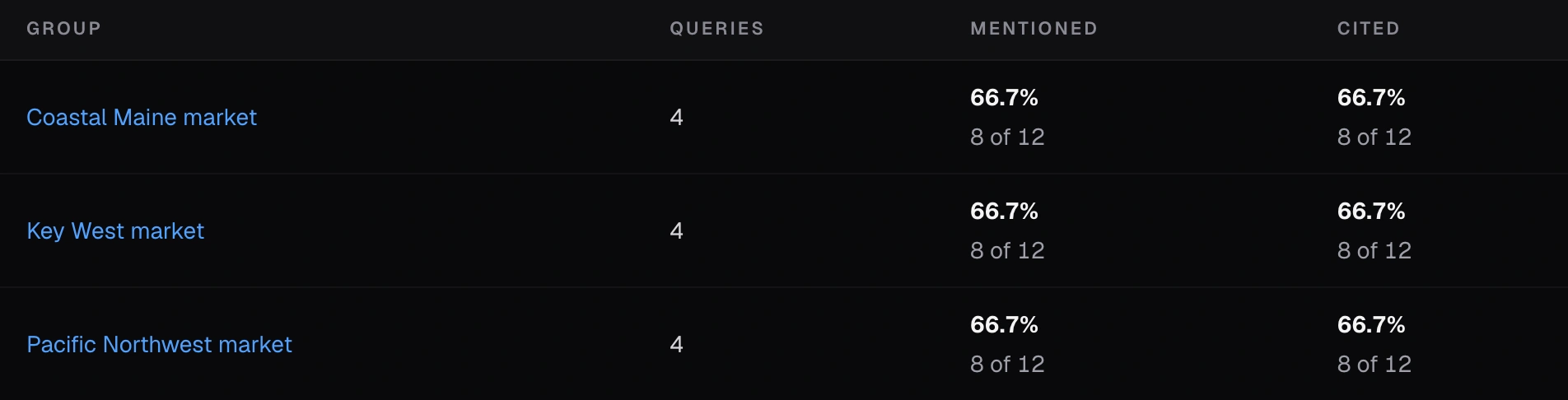
Start with the local picture.
Compare property mentions and citations across Coastal Maine, Key West, and the Pacific Northwest.
Who Custom Is For
A clear view of every market in your portfolio.
A franchise, multi-location brand, or property portfolio can serve many markets under one domain. Each market has its own buyers, questions, pages, competitors, and AI results.
Canonry keeps each result with its market and shows all markets together. Our guide to one site with many markets explains how this works.
- Franchise teams and franchisee groups
- Track the brand across local markets, with separate questions, competitors, and results for the locations you manage.
- Multi-location brands
- See which branches and markets appear in AI answers, and which local pages need work.
- Hospitality and multifamily portfolios
- Review hotels, resorts, or apartment communities separately, with a shared view across the portfolio.
- Private equity firms
- Plan AI search work for portfolio companies, with each business's measurement, data, and team access scoped separately.
One score can hide local gaps
One score cannot explain every market.
A brand can look strong overall while it drops out of key local AI answers.
Custom shows the whole brand and lets you check each market on its own.
How We Set It Up
Start with your markets.
We map your domain, markets, and local buyer questions. That map shapes the shared view.
- 01
Map your site
Start with your main domain, a list of markets, and each market's pages.
- 02
Define each market
Choose the buyer questions and competitors to track in each market, with shared questions where they apply.
- 03
Build the market view
Bring the results into one view to see which markets improved, declined, or need work. Each result stays linked to its market and sources.
Add More Data
Connect data after we map the markets.
Once each market has its questions, brands, and pages, we can add the data your team needs.
Connect after we map markets
Each result keeps its market and source.
Add only the data you need. Each result shows where it came from and which market it covers.
- 01
AI answers
Mentions, citations, competitors, sources, buyer questions, and run history
- 02
Search
Google Search Console, Bing, and optional Google Business Profile data
- 03
Engagement
GA4 visits, clicks from AI, traffic sources, lead events, and page use
- 04
Server traffic
Visits linked to AI bots, user requests, and AI links in supported logs
- 05
Technical
Site audits, structured data, search indexing, backlinks, content ideas, and approved fixes
Server Visits
See visits linked to AI tools in your server logs.
We read server logs from supported hosts without adding a browser tag or changing your site's app code. Cloud Run and Vercel use existing logs; Cloudflare uses a Canonry Worker to select events. When the logs contain enough detail, we identify the AI source and show whether it was verified.
WordPress uses our Traffic Logger plugin. Before calling the data complete, we check which visits the logs capture and note gaps caused by caching, access rules, or log retention.
Which markets fell in AI search after our last site update?
visibility.compare · gsc.performance · ga4.traffic · traffic.eventsTwo markets lost mentions and citations. I attached the buyer questions, pages, competitors, and source results.
For the team and its agents
Use the market view where your team works.
Each Custom setup includes an app built for your team. Your team can also use APIs and AI agents to review results and take approved actions. Supported tools include CLI, REST, MCP, webhooks, and plugins. Explore these options on the open-source Canonry platform. We agree on which tools and data to connect. We can also plan and test a ChatGPT connector as extra work.
Teams can limit each person's access to the markets, results, and actions they need.
Clear answers
Before we map your markets.
Who is Canonry Custom for?
Canonry Custom is for in-house franchise teams, franchisee groups, multi-location brands, hospitality and multifamily portfolios, private equity firms, and their agencies. It fits businesses that need separate buyer questions, pages, competitors, and AI results for each market under one domain, with a shared portfolio view.
Can private equity firms use Custom for portfolio companies?
Yes. We scope each company's site, markets, evidence, and team access separately. Each business can track its local markets and use a custom app, connected data, reports, and agent tools. We agree on reporting needs and integrations before building the setup.
What makes a portfolio complex?
Locations may share a website but serve different buyers and compete with different businesses. Custom keeps those markets separate so a strong result in one place does not hide a gap elsewhere. We map the locations, properties, brands, and reporting needs before planning the setup.
Why not use one score for the whole site?
Each market has its own buyer questions, pages, competitors, and AI results. A single score blends these together and can hide where a market improved, declined, or needs work.
How do you keep market results apart?
We assign pages, buyer questions, and competitors to each market. Questions can be shared across markets, while local results stay linked to the market they describe.
Can we see each market and all of them together?
Yes. The portfolio view shows the overall trend and which markets changed. You can also review each market's questions, pages, competitors, answers, mentions, citations, and sources.
What do you need to plan the work?
Share your domain, markets, pages, buyer questions, competitors, and the AI tools you want to track. We use your reporting needs to map the markets, then plan the data and tools your team will use.
How do you collect AI answers?
We use provider APIs for repeatable checks. Optional browser tests show how answers appear in the apps people use and are labeled separately. Each result keeps the answer, citations, provider, model, location, method, and date.
How do you limit client and team access?
Each client has a separate system. Team members can access only the markets, tools, and results they need. The same agreed limits apply in the app, reports, APIs, and agent tools.
Canonry Custom
Plan AI visibility across your portfolio.
Tell us about your brand, domain, locations, and markets. We will plan the questions, competitors, pages, reports, and tools your team needs.