VideosFree and open source
Stop renting your AI visibility tool
Canonry is MIT licensed and self-hosted, with every answer and metric in one SQLite file.
Canonry is open source (MIT) and runs on your own machine or server. Install it from npm, keep every answer and metric in one SQLite file, and use your own OpenAI, Gemini and Anthropic keys. You pay your AI providers directly; there is no subscription.
What the video shows
- npm install, cnry bootstrap, cnry serve
- Every answer and metric in ~/.canonry/data.db
- Your own provider keys in config.yaml
- The full dashboard on localhost
- MIT licensed on GitHub
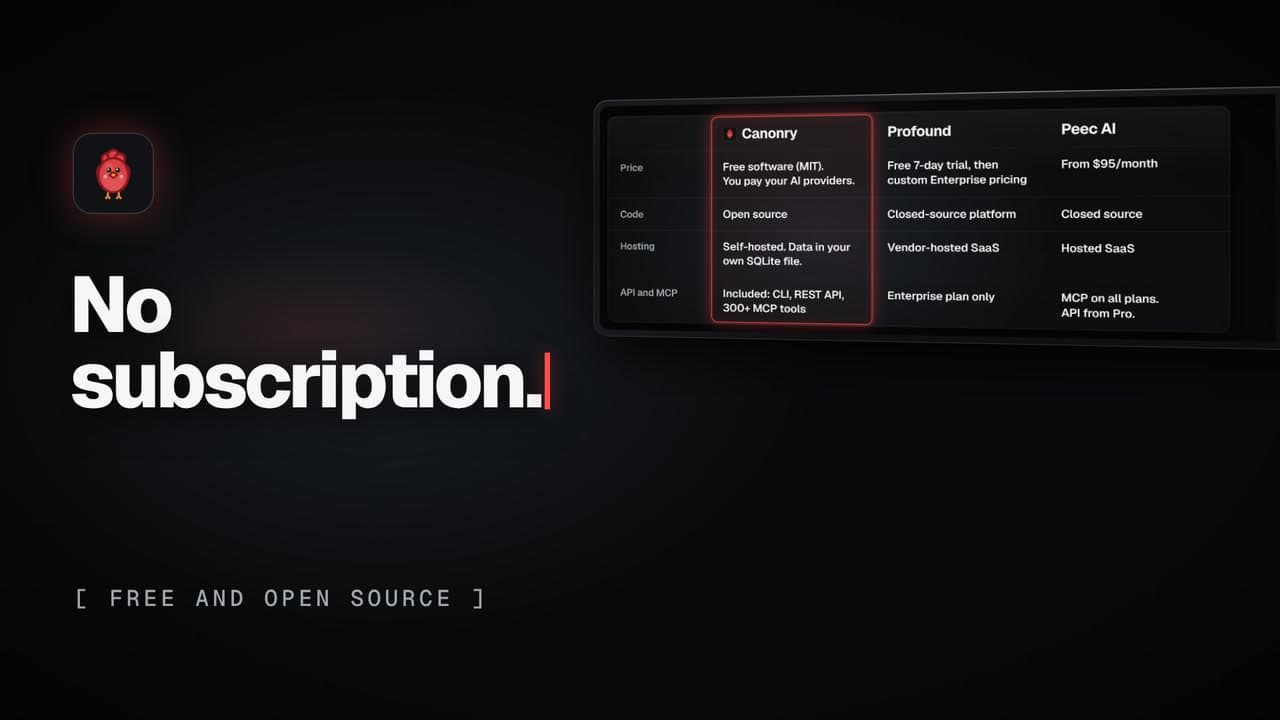
- Code and hosting compared with Profound and Peec AI
The comparison in the video
| Compared on | Canonry | Profound | Peec AI |
|---|---|---|---|
| Code | Open source | Closed-source platform | Closed source |
| Hosting | Self-hosted. Data in your own SQLite file. | Vendor-hosted SaaS | Hosted SaaS |
Public pricing pages, checked Nov 9, 2026. US prices, monthly billing. Rechecked against the same pages on Nov 15, 2026. Prices and plans change, so check the current pages.
On-screen text
Stop renting your AI visibility tool. Canonry is free, open-source software you run yourself.
Self-hostedThree commands. It runs on your machine.
One fileEvery answer and metric in one file you own
Bring your own keysYour keys. You pay your AI providers.
DashboardThe full dashboard, on localhost
Open sourceMIT licensed, on GitHub
CompareOpen source. Self-hosted.
Canonry. The open-source AEO operating platform.
Run Canonry yourself
Canonry is free software (MIT). You pay your own AI providers for the answers it checks. Install it from npm, then run cnry bootstrap.
npm install -g @canonry/canonry